
Discover Smooth Inking Brushes for Procreate designed for artists who want clean, controlled, and natural-looking strokes in their digital artwork. This brush collection is ideal for creating smooth outlines, flowing line art, hand lettering, doodles, illustrations, and polished sketches directly in Procreate.
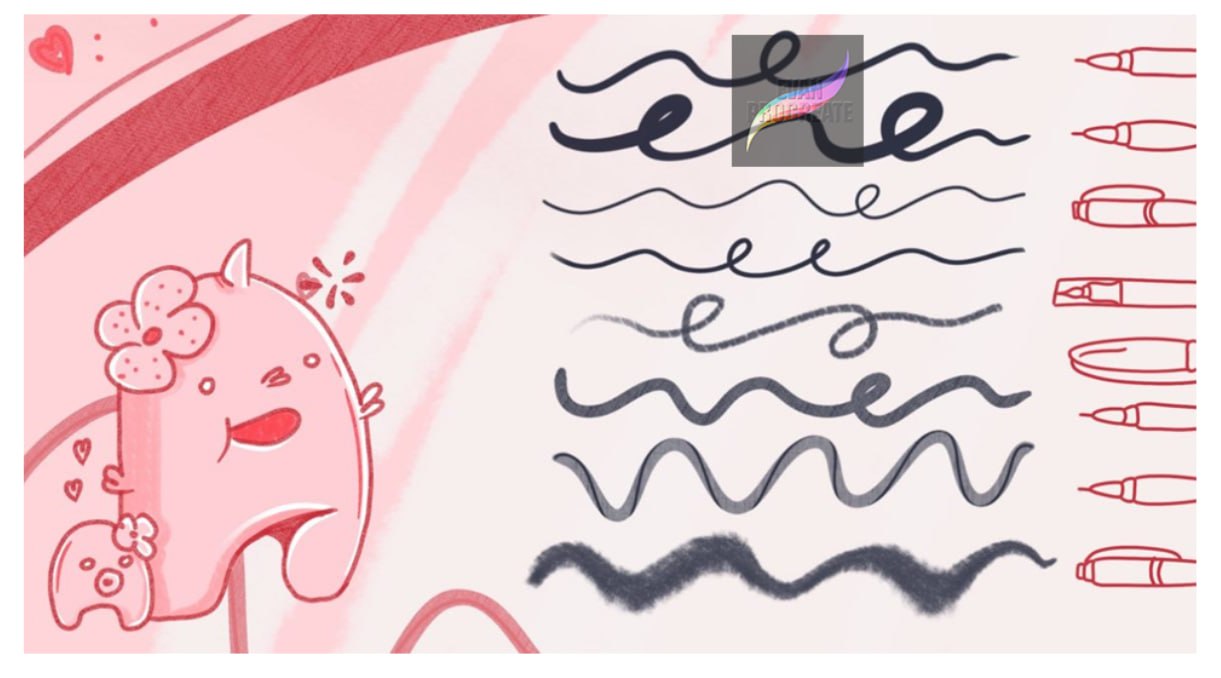
The brushes are made to give your strokes a fluid and responsive appearance, helping you create everything from delicate curved lines to thicker expressive marks. As shown in the preview, you can experiment with different line weights, smooth continuous strokes, playful waves, loops, and more organic textured lines.
Whether you’re working on cute illustrations, character art, lettering projects, stickers, digital planners, or printable designs, these Smooth Inking Brushes for Procreate can help you achieve a cleaner and more consistent finish.
Smooth and Controlled Inking
Creating polished digital line art often depends on having a brush that feels predictable and comfortable. These Procreate inking brushes are suited to artists who prefer smooth curves and controlled outlines without making their artwork look overly mechanical.
Use them for:
- Clean digital line art and outlines
- Smooth character illustrations
- Hand lettering and calligraphy-style strokes
- Cute doodles and simple illustrations
- Sticker and clipart designs
- Comics and cartoon artwork
- Decorative lines and flourishes
- Digital journaling
- Printable artwork
- Everyday sketching and drawing
The variety of stroke styles makes the brushes useful for both precise drawing and more relaxed, expressive artwork.
Great for Lettering and Decorative Lines
These brushes are also useful when working with handwritten titles, signatures, decorative lettering, or flowing line elements. Smooth curves and consistent strokes can make your lettering look cleaner while still keeping the natural feeling of hand-drawn artwork.
You can experiment with loops, waves, swashes, borders, and other decorative details to give your designs more personality.
Perfect for Cute and Minimal Illustrations
The soft, playful style shown in the brush preview works especially well for kawaii drawings, simple characters, stationery illustrations, digital stickers, and minimalist artwork.
If you enjoy creating clean illustrations with rounded shapes and expressive outlines, these brushes provide a versatile starting point for building your Procreate artwork.
Create Different Line Weights
Experiment with thin, medium, and bold strokes depending on the look you want to achieve. Fine lines can be useful for small details and delicate illustrations, while thicker strokes work well for strong outlines, cartoon artwork, lettering, and decorative elements.
The brushes can also be used together within the same illustration to create more visual depth and variation.
Who Are These Brushes For?
These Smooth Inking Brushes for Procreate are suitable for beginners as well as experienced digital artists looking for additional brushes to add to their Procreate workflow.
They’re especially useful for:
Digital illustrators, lettering artists, doodle artists, sticker designers, cartoon artists, creators of printable products, and anyone who enjoys experimenting with clean digital ink.
Add these smooth Procreate brushes to your creative toolkit and start experimenting with flowing outlines, expressive marks, decorative strokes, and polished digital illustrations.
If you’re searching for Smooth Inking Brushes for Procreate that can be used across drawing, lettering, line art, and illustration projects, this collection offers a simple and versatile way to expand your Procreate brush library.
Reviews
There are no reviews yet.