
Create soft, flowing hairstyles and expressive digital illustrations with Blend Hair Brushes for Procreate. This 3-brush set is designed for artists who want to draw, shape, and blend digital hair with smooth, natural-looking strokes inside Procreate.
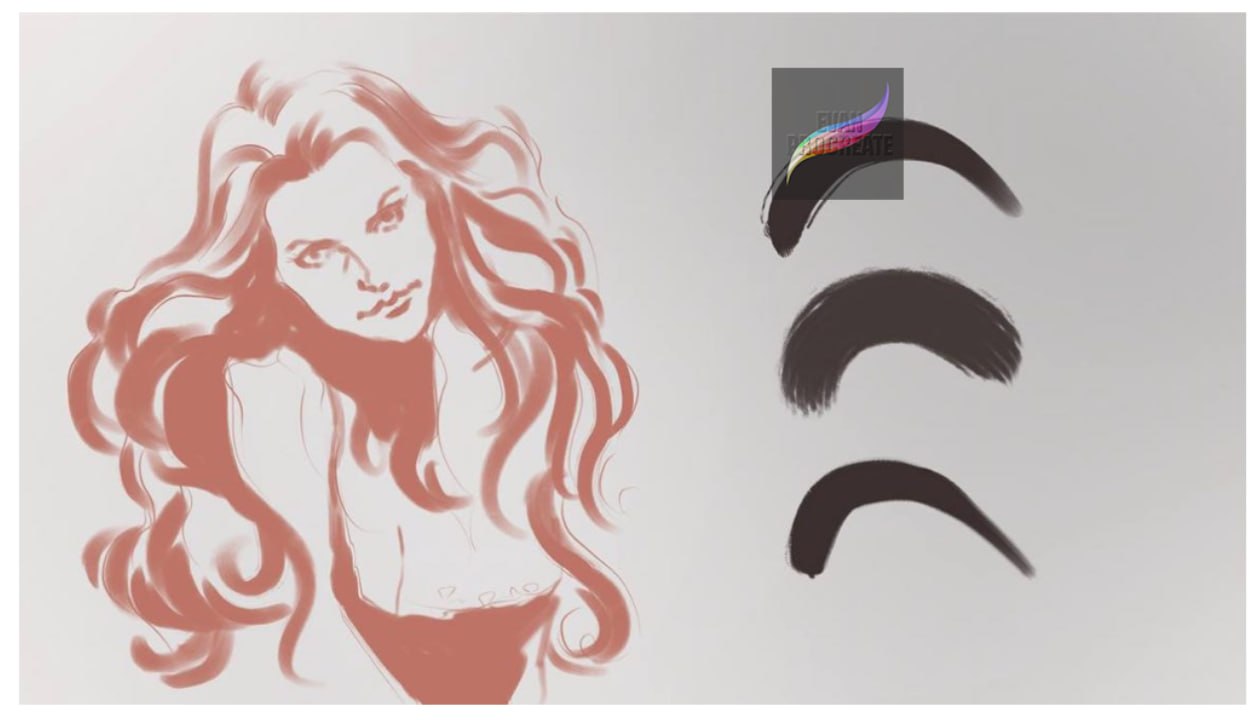
The preview showcases all three individual hair brushes, each producing a different type of stroke. From smooth tapered marks to softer textured edges, the brushes can be combined to build flowing locks, curved strands, layered hairstyles, and stylized hair illustrations.
These Blend Hair Brushes for Procreate are especially useful for portrait artists, character designers, and digital illustrators who want an easier way to create movement and dimension in hair.
3 Different Hair Brushes
This set contains 3 distinct brushes, with each brush demonstrated individually in the preview image.
The different stroke styles allow you to experiment with:
- Smooth flowing hair shapes
- Soft textured hair edges
- Tapered strands
- Thick locks and sections of hair
- Curved and wavy hairstyles
- Layered hair effects
- Soft transitions and blending
- Stylized digital hair illustration
Use one brush throughout your artwork or combine all three to create more variation and depth.
Create Smooth, Flowing Hair in Procreate
Drawing hair strand by strand can be time-consuming. These Blend Hair Brushes for Procreate can help you establish larger hair shapes first and then gradually add smaller details.
The long, curved brush strokes are especially useful for following the natural direction of hair. You can create sweeping locks around the face, long flowing hairstyles, waves, curls, and other stylized forms.
Changing the brush size gives you even more control. Larger sizes can be used for broad sections of hair, while smaller sizes can help define individual strands and finishing details.
Perfect for Digital Portraits
The brushes are a useful addition to portrait and character illustration workflows. Start by creating the overall silhouette of the hairstyle, then build additional layers of strokes to create movement and separation.
They can be used for:
- Digital portraits
- Character illustrations
- Female and male hairstyles
- Long flowing hair
- Wavy hairstyles
- Fantasy characters
- Fashion illustrations
- Cartoon and anime-inspired artwork
- Digital painting
- Hair studies and drawing practice
Whether your style is polished or intentionally loose, these brushes can be adapted to different types of digital artwork.
Blend and Layer Hair Naturally
Layering is an effective way to make digital hair feel more dimensional. Begin with larger shapes, then introduce progressively smaller strokes to suggest individual sections and strands.
You can also work on separate Procreate layers, allowing you to adjust opacity and experiment with your hair details without affecting the rest of your illustration.
Combining the three brushes can help create contrast between smoother areas and more textured sections.
Soft and Tapered Brush Strokes
The brush examples in the preview demonstrate smooth curved strokes with different edge characteristics. Some appear cleaner and more solid, while another introduces a softer, more textured finish.
These differences make the set useful for building multiple stages of a hairstyle—from broad base shapes to softer edges and detailed finishing strokes.
The tapered appearance can also help create more natural-looking ends instead of giving every strand the same thickness.
Great for Long and Wavy Hairstyles
The flowing character illustration shown in the preview demonstrates how curved strokes can be used to create long, expressive hair.
Follow the direction of the hairstyle with continuous movements, allowing the brush curves to form locks and waves. Layering overlapping strokes can create the impression of volume without requiring every individual hair to be drawn manually.
This technique is particularly useful for:
- Long hairstyles
- Loose waves
- Flowing fantasy hair
- Voluminous character hair
- Soft curls
- Dynamic hair movement
Customize the Brushes to Your Style
You can experiment with brush size, opacity, pressure, color, and layering to achieve different results.
Use larger strokes to establish the main hair mass, medium strokes for individual locks, and smaller strokes for highlights or fine details. Varying the direction and size of your marks can prevent the hairstyle from looking repetitive.
The Blend Hair Brushes for Procreate can therefore work with a variety of illustration styles, from simple character drawings to more developed digital portraits.
Useful for Beginners and Digital Artists
If you’re learning how to draw hair in Procreate, using dedicated hair brushes can help you understand how larger hair sections flow around the head before adding detailed strands.
More experienced illustrators can incorporate the brushes into an existing workflow to speed up hair rendering and create expressive finishing details.
With 3 different brush styles, this compact set gives you practical tools for creating smooth strokes, textured edges, layered locks, and flowing hairstyles.
Add these Blend Hair Brushes for Procreate to your digital art toolkit and experiment with smoother, faster, and more expressive hair illustration.
Reviews
There are no reviews yet.