
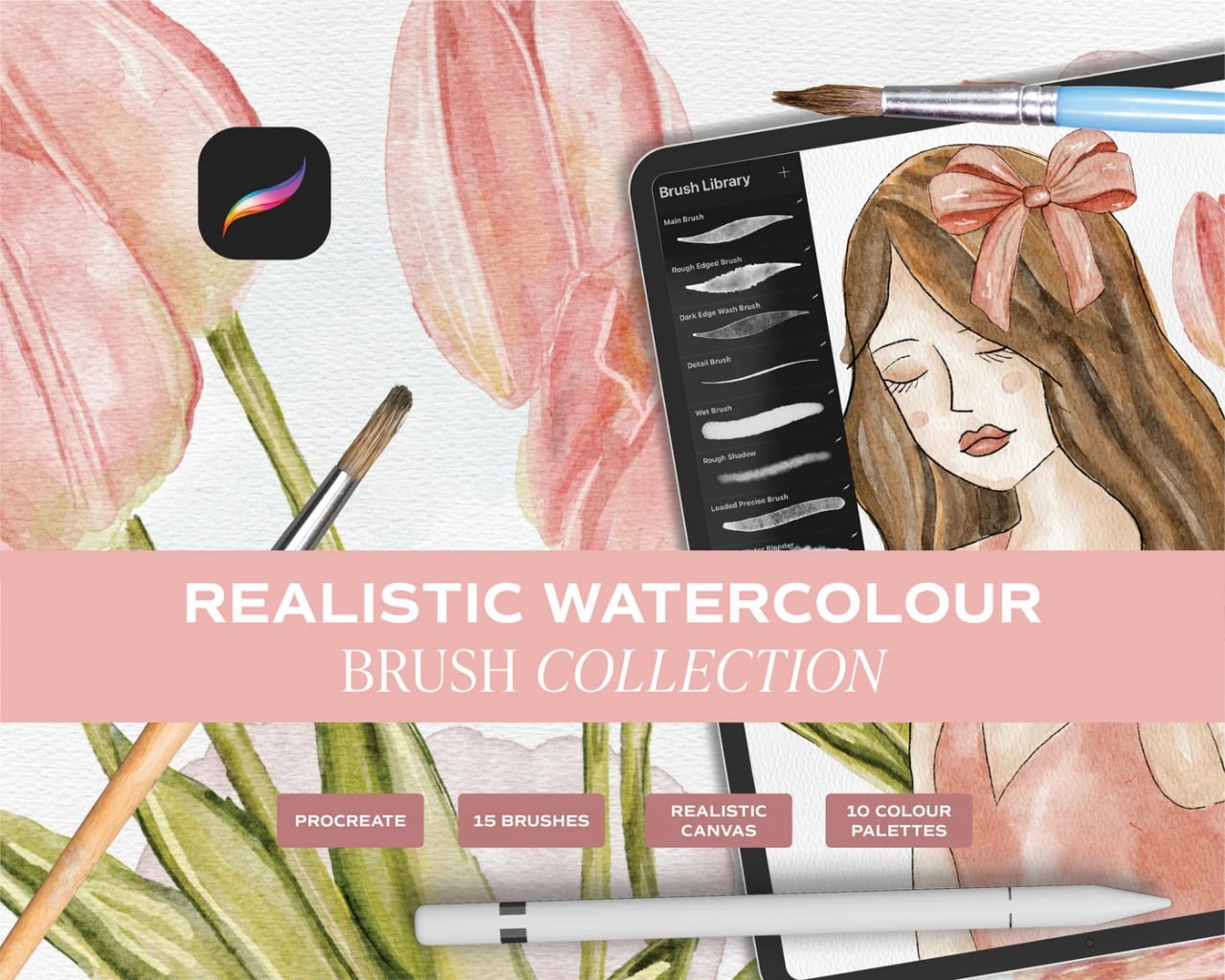
Bring the soft, organic beauty of traditional painting into your digital artwork with this Free Realistic Watercolour Procreate Brushset. Designed for Procreate artists who love delicate washes, textured edges, natural pigment effects, and hand-painted illustrations, this collection gives you a versatile set of watercolor-inspired tools for creating artwork directly on your iPad.
According to the collection preview, this Free Realistic Watercolour Procreate Brushset includes 15 Procreate brushes, a realistic canvas, and 10 colour palettes, giving you a complete starting point for building beautiful watercolor-style illustrations.
The brushes shown in the Procreate Brush Library offer a variety of painting behaviors, from broad watercolor marks to finer details, wet-looking strokes, rough edges, shadows, and layered washes. This makes the collection useful for both loose watercolor painting and more detailed illustration work.
What’s Included
This watercolor collection includes:
- 15 Procreate brushes
- Realistic watercolor canvas
- 10 colour palettes
- Watercolor-style painting brushes
- Rough-edged brush effects
- Fine detail strokes
- Wet-looking brush effects
- Wash-style brushes
- Shadow and texture brushes
- Brushes for layered watercolor effects
Together, these tools can help you recreate the appearance of traditional watercolor painting while keeping the flexibility of a digital workflow.
Create Realistic Watercolor Effects in Procreate
Watercolor is loved for its softness, transparency, irregular edges, and naturally layered appearance. This Free Realistic Watercolour Procreate Brushset is designed to help reproduce those characteristics digitally.
Use lighter strokes to build transparent-looking washes, then gradually layer additional colors and textures to create depth. The different brush styles allow you to move between broad painted areas and delicate finishing details without leaving Procreate.
You can experiment with opacity, brush size, pressure, and layering to create anything from subtle pastel illustrations to richer watercolor paintings.
15 Brushes for Different Watercolor Techniques
The collection contains 15 brushes, allowing you to switch between different painting effects throughout your artwork.
The preview shows brush styles suitable for techniques such as:
- Broad watercolor washes
- Soft color transitions
- Rough watercolor edges
- Detailed line work
- Wet brush effects
- Textured shading
- Layered pigment effects
- Soft shadows
- Controlled watercolor strokes
Using multiple brush styles within one illustration can help create more convincing variation and prevent digital watercolor from appearing too uniform.
Realistic Watercolor Canvas
The included realistic canvas adds another layer of traditional character to your digital artwork.
Paper texture plays an important role in traditional watercolor painting because pigment reacts visually with the surface of watercolor paper. A textured digital canvas can help give your finished illustration a more tactile, hand-painted appearance.
Pair the canvas with the watercolor brushes to create artwork that feels closer to painting on physical paper.
10 Colour Palettes Included
This collection also features 10 colour palettes, providing convenient color combinations for experimenting with different watercolor illustrations.
Use the palettes as a starting point for your artwork or modify the colors to match your own style. Having ready-made palettes can be particularly useful when you want to maintain harmonious colors across an illustration.
Perfect for Floral Watercolor Art
The soft botanical artwork shown in the preview demonstrates how well this style works for flowers and natural subjects.
You can use the Free Realistic Watercolour Procreate Brushset to create:
- Watercolor flowers
- Botanical illustrations
- Leaves and greenery
- Floral patterns
- Nature-inspired artwork
- Greeting card illustrations
- Printable artwork
- Decorative digital paintings
The combination of washes, textured strokes, and finer brushes makes it possible to build everything from large petals and leaves to smaller decorative details.
Great for Portraits and Character Illustration
Watercolor brushes are not limited to botanical artwork. The illustrated character shown in the preview demonstrates how the brushes can also be incorporated into portrait and character designs.
Use broad washes for clothing and hair, softer colors for skin, and finer brushes for facial features, outlines, and small details.
The watercolor aesthetic works especially well for whimsical, feminine, storybook, fashion, and hand-painted illustration styles.
Ideal for Digital Artists and Beginners
Whether you’re experienced with digital watercolor or just starting to explore Procreate, this brush collection provides several tools for experimenting with different painting techniques.
Beginners can start with simple shapes and washes before gradually layering colors. More experienced artists can combine the different brushes, canvas texture, and palettes to build more detailed illustrations.
You can use the brushset for:
- Digital watercolor painting
- Floral illustration
- Character art
- Portraits
- Fashion illustration
- Botanical art
- Pattern design
- Digital journaling
- Printable artwork
- Greeting cards
- Creative lettering backgrounds
- Personal illustration projects
Tips for Using Watercolour Brushes in Procreate
For more natural-looking watercolor artwork, avoid trying to complete everything with a single brush stroke. Build your painting gradually using separate layers and different brush styles.
Start with lighter base colors, add darker tones where you want depth, and use textured or rough-edged brushes selectively. Fine brushes can then be used for outlines and smaller details.
You can also reduce layer opacity or experiment with Procreate blending options to create softer transitions between colors.
This Free Realistic Watercolour Procreate Brushset gives digital artists a versatile collection of 15 brushes, 10 colour palettes, and a realistic canvas for creating soft, textured, watercolor-inspired artwork in Procreate.
Reviews
There are no reviews yet.