
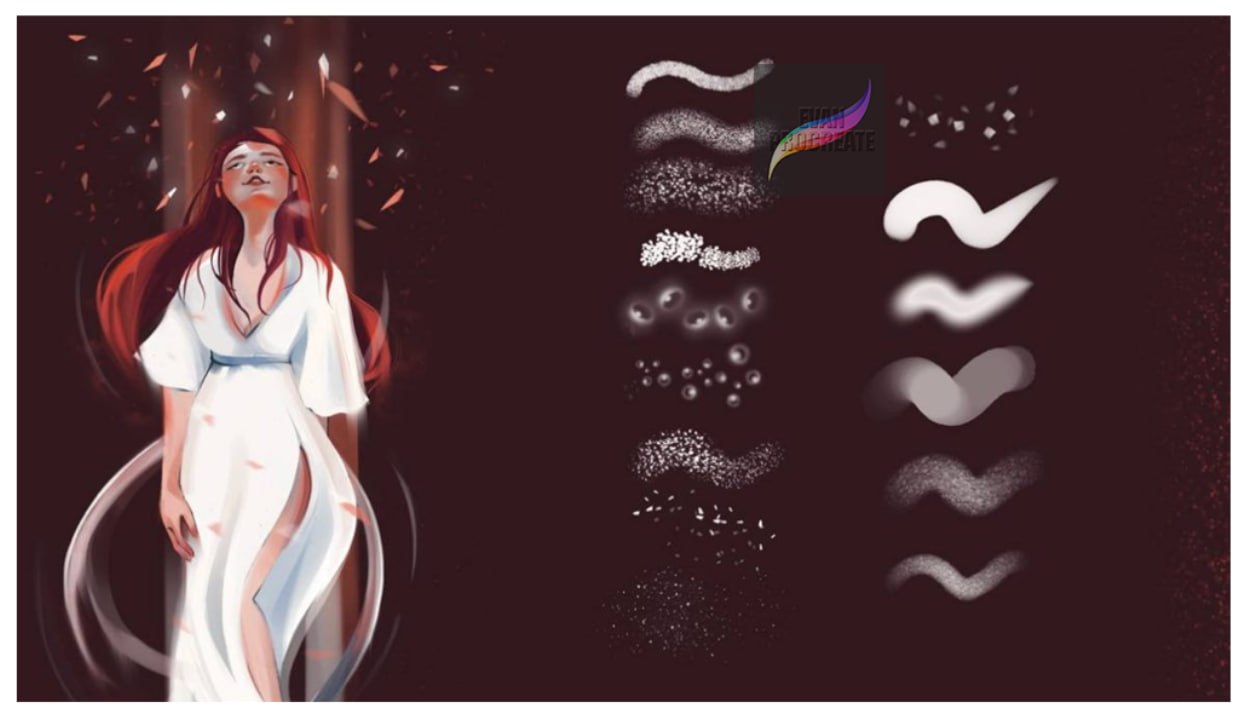
Create more natural and detailed digital portraits with Skin Texture Brushes for Procreate. This brush collection is designed to help digital artists add realistic-looking skin texture, subtle pores, grain, soft shading, scattered details, and organic surface effects to portraits and character illustrations in Procreate.
As shown in the preview image, each individual stroke represents a different brush, giving you a varied selection of textures and effects to experiment with. The set includes brushes ranging from soft and diffused textures to more visible grain, speckles, dots, scattered particles, and textured shading strokes.
These Skin Texture Brushes for Procreate can help make digitally painted skin feel less flat by adding subtle variation and depth while maintaining control over your illustration.
Add Natural Texture to Digital Skin
Smooth digital painting can sometimes make skin appear overly polished. Texture brushes allow you to introduce small variations that can give portraits a more organic appearance.
Depending on the brush and how lightly you apply it, you can use these brushes for areas such as cheeks, forehead, nose, shoulders, arms, and other parts of a painted character.
Experiment with brush size, opacity, pressure, and layering to create anything from barely visible texture to stronger stylized effects.
Multiple Skin Texture Brush Styles
The preview demonstrates a variety of individual brush strokes rather than one repeated effect. The collection features different visual textures, including:
- Fine grain and subtle skin texture
- Soft scattered particles
- Small dot and pore-like patterns
- Speckled texture brushes
- Diffused shading strokes
- Soft airbrush-style textures
- Rough and organic grain
- Stipple-inspired effects
- Irregular scattered marks
- Smooth textured blending strokes
- Soft highlight-style marks
- Atmospheric particle effects
Because each line shown in the preview is a separate brush, you can switch between different textures depending on the area of the portrait you are painting.
Great for Portrait Painting in Procreate
These Skin Texture Brushes for Procreate are especially useful for digital portrait artists who want to add extra detail without manually drawing every tiny pore or texture mark.
They can be incorporated into different stages of your workflow. Start with your normal base colors and shading, then apply texture selectively over the skin. Using lower opacity can create subtle results, while layering different brushes can produce richer surface variation.
They are suitable for creating:
- Digital portraits
- Character illustrations
- Semi-realistic artwork
- Stylized portraits
- Fantasy characters
- Face studies
- Digital paintings
- Skin shading
- Highlights and texture
- Concept art
Create Pores, Grain and Subtle Details
One of the most useful applications of skin brushes is adding fine surface detail. Instead of keeping every area perfectly smooth, you can introduce controlled grain, dots, speckles, and irregular marks.
For example, finer brushes can be applied lightly around the nose and cheeks, while softer textured brushes can help add variation to larger areas of the face and body.
The goal does not always have to be photorealism. These brushes can also be used to create stylized texture that complements painterly or illustrated artwork.
Useful for Soft Shading and Highlights
Not every brush in this collection is limited to visible pores. Several of the demonstrated strokes have soft, diffused qualities that can also work well for gentle shading, transitions, highlights, glow effects, and atmospheric details.
Combining smoother strokes with grainier textures can help you build depth while keeping your digital painting visually interesting.
Adjust the Brushes to Match Your Art Style
Procreate gives you plenty of control over how brushes behave. Try changing brush size, opacity, pressure, and layer blending to create different effects from the same brush.
For subtle skin detail, apply texture gently on a separate layer and reduce the layer opacity. For more stylized artwork, increase the visibility of the grain or combine multiple texture brushes.
This makes the Skin Texture Brushes for Procreate useful across a range of digital painting styles rather than limiting them to one specific type of portrait.
Perfect for Digital Artists and Portrait Illustrators
Whether you’re practicing digital portrait painting or adding finishing touches to detailed character artwork, this collection gives you a convenient selection of textures to explore.
Use the brushes individually or combine several effects to develop more interesting skin surfaces, soft transitions, painterly texture, and detailed finishing touches.
If you’re searching for Skin Texture Brushes for Procreate to enhance portraits with pores, grain, shading, speckles, and organic details, this brush collection can be a useful addition to your Procreate brush library.
Reviews
There are no reviews yet.